Xtream Codes: what they are & how to log in.
The simple 3-field login behind every major IPTV app. Learn what Xtream Codes are, how the Xtream Codes API works, and how to sign in with your GoldenOTT details in seconds.
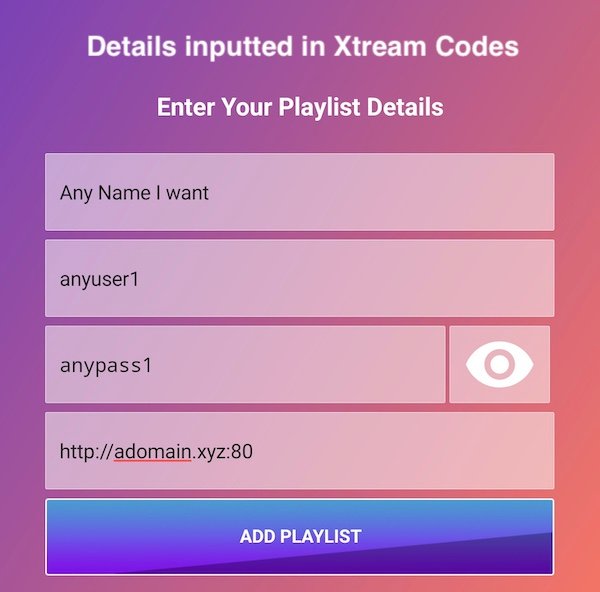
What are Xtream Codes?
Xtream Codes is a login format — three details that let any IPTV app load your whole service automatically.
Instead of pasting one long playlist link, your provider gives you a server URL, a username and a password. The app uses them to connect and pull in live TV, movies, series and the on-screen TV guide (EPG) — neatly sorted into categories. It’s the cleanest, most reliable way to sign in, which is why nearly every popular IPTV app offers a “Login with Xtream Codes API” option.
With GoldenOTT you receive your Xtream Codes login instantly after subscribing — ready to paste into the app of your choice.
The three fields
Server URL — where your service lives.
Username — your account name.
Password — your secret key.
Enter once and the app remembers it.
How to log in with Xtream Codes
The same four steps in almost every IPTV app.
Open your app
Launch IPTV Smarters Pro, TiviMate or any player, and choose Add User / Add Playlist.
Pick Xtream Codes API
Select Login with Xtream Codes API rather than the M3U option.
Enter your 3 details
Type the server URL, username and password GoldenOTT sent you. Add any name you like.
Done
The app loads all channels, VOD and the TV guide. Sit back and watch.
Xtream Codes vs M3U
Same channels, two login styles — GoldenOTT gives you both.
Xtream Codes API
Three fields — server, username, password. Keeps live TV, movies, series and EPG neatly separated and updates automatically. The tidier, recommended choice.
M3U URL
One long link that contains everything. Universal and quick to paste, and the best fallback on apps that don’t offer the Xtream option. Also included with every GoldenOTT plan.
Xtream Codes questions
What are Xtream Codes?
A login format used by IPTV apps. Instead of a long playlist link, your provider gives you a server URL, a username and a password, which the app uses to load your live TV, movies, series and TV guide automatically.
What is the Xtream Codes API?
The connection method behind that login. When you choose “Login with Xtream Codes API” and enter your server, username and password, the app talks to the provider’s server to pull your channels and EPG.
How do I log in with Xtream Codes?
Open your app, choose “Login with Xtream Codes API”, then enter the server URL, username and password from your provider. GoldenOTT sends all three the moment you subscribe.
What’s the difference between Xtream Codes and M3U?
Both deliver the same channels. Xtream Codes uses three fields and keeps categories and EPG neatly organised; M3U uses one long URL. Xtream is usually the tidier option.
Are Xtream Codes legal?
Xtream Codes is just a login format, which is legal. What matters is the provider — watching is legal when the service is properly licensed. This is general information, not legal advice.
Get your Xtream Codes login instantly.
Subscribe to GoldenOTT and we’ll send your server, username and password right away — works in every IPTV app, 22,000+ channels in 4K.